
Squid Mahjong Connect 2
A Squid Game-styled connect board from WillingGames.com, where each level runs on a clock and Hint and Shuffle are the only way out of a dead layout.
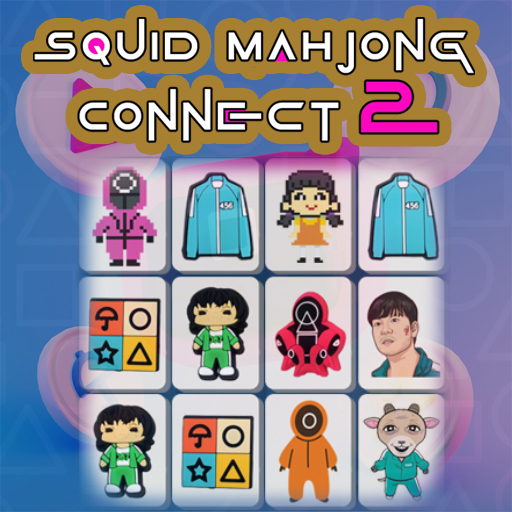
Squid Mahjong Connect 2 borrows the imagery of the Squid Game series and drops it onto a connect board: two tiles carrying the same picture clear together, provided a line can join them with no more than two ninety-degree turns.
WillingGames.com runs each layout against a time limit, which changes what a good move is. A pair you can already see beats a tidier pair you might find in ten seconds, and the game keeps score by how deep into its level ladder you get before the countdown wins. Easter Mahjong sets out another one-layer board on the same rule.
Two buttons sit under the board. Hint marks one pair that is currently joinable, and Shuffle redeals the squid tiles when the arrangement has locked with matches still on it. Difficulty climbs from level to level, so both are worth hoarding for the crowded boards rather than spending on an opening that a second sweep would solve. A longer explanation of the rule sits in the guide to connect boards.
The stage is a 1280 by 720 frame, and the full screen toggle on this page is what makes the near-identical symbols readable at a glance. Touch input works as well, so the same level ladder clears on a tablet. Two turns and nothing in the way is also the rule in the Connect 2 grid.
Controls
Mouse on desktop, or tap the tiles on a touchscreen.
How to Play
- Scan the board for two squid tiles showing the same picture.
- Trace the route between them: the line may bend twice at most, and it cannot cut through a tile that is still standing.
- Click one tile, then its twin, and the pair leaves the board.
- Empty every tile before the level timer expires to move up to the next layout.
- Spend Hint when your eyes have stalled, and Shuffle only when nothing on the board can be joined.
Tips & Tricks
- Work the outside in — tiles at the rim of a squid layout have the free space a two-turn line needs.
- Count the corners before you click — a route that needs three bends is not a legal pair yet, however identical the pictures look.
- Bank the Hint button — the later levels are the crowded ones, and that is where a marked pair saves real seconds.
- Shuffle only on a locked board — redealing while joinable pairs remain throws away the position you already read.
- Go full screen first — the Squid Game symbols separate cleanly on an enlarged stage, and mis-clicks stop.
Frequently Asked Questions
How do you clear a pair in Squid Mahjong Connect 2?
Two tiles with the same picture vanish when a line can join them using no more than two ninety-degree turns.
Is Squid Mahjong Connect 2 played against a clock?
Yes. Every level carries a time limit, and the board has to be empty before it runs out.
What do the Hint and Shuffle buttons do in Squid Mahjong Connect 2?
Hint marks one joinable pair; Shuffle redeals the remaining squid tiles when the layout has no legal move left.
Does Squid Mahjong Connect 2 open in full screen?
It does, and the 1280 by 720 stage enlarges well — worth setting before the symbols start repeating.
Can Squid Mahjong Connect 2 be played on a tablet?
Yes, the build takes taps, and the same level progression carries across from desktop.